Contact Us
Reach out directly: help@nooa.coach Download the user manual
Questions?
We've got answers
- Download the NOOA app from the App Store or Google Play.
- Register with the email you used at purchase.
- Turn on Bluetooth and power on your band.
- Tap the + icon on the top navigation in the app.
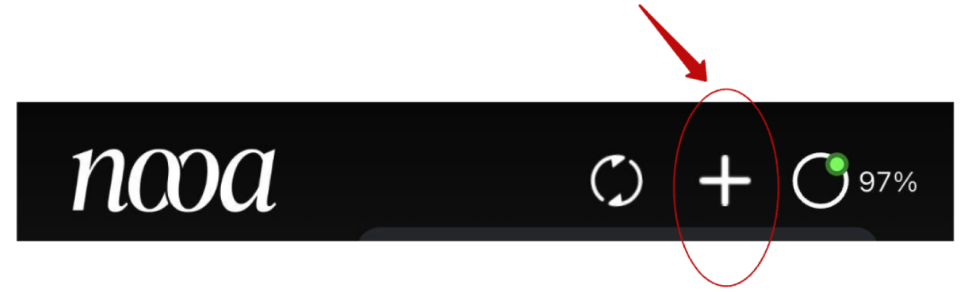
If pairing fails, turn Bluetooth off and on, restart the app, and try again.
- Make sure Bluetooth is on.
- Keep your phone within 10 feet of the band.
- Open the NOOA app — syncing happens when the app is open.
- Force-close and reopen the app if data still isn't appearing.
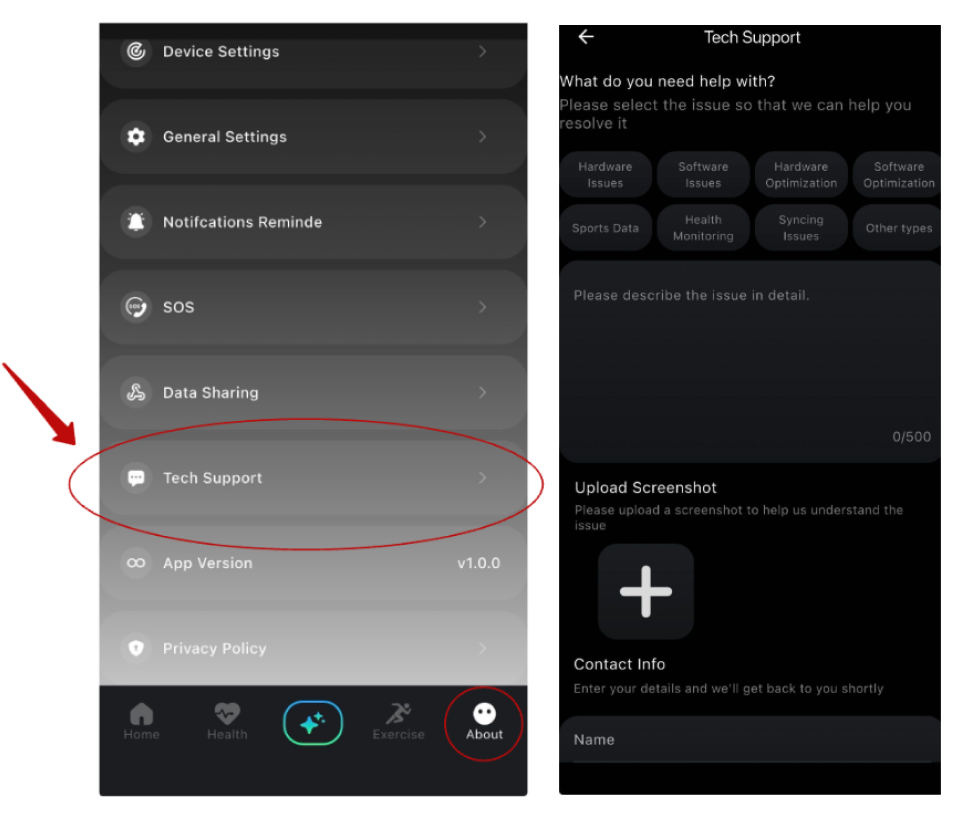
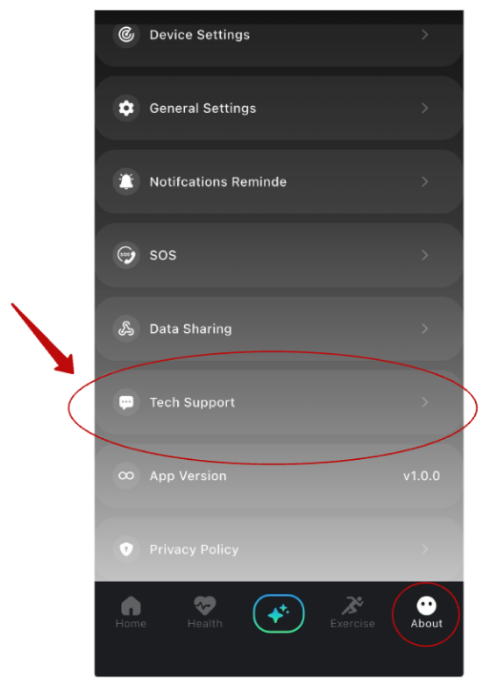
- Open a ticket under Tech Support in the About tab of the app if you need additional help.
It carries an IP68 rating — water-resistant up to 1.5 meters of fresh water for 30 minutes. Safe for showers, sweat, and workouts. Avoid salt water, hot tubs, and saunas.
1 week+ on a single charge. A full charge may take up to 60–90 minutes.
iPhone 8 and newer (iOS 14+) and Android 8.0 and above.
No. The app is free with your band, and there's no subscription.
45 days from delivery. Full refund, no questions asked. To start a return, email
help@nooa.coach with your order number.
Email help@nooa.coach with your order number and we'll send tracking.
Plug it into the charger for at least 15 minutes, then try again. If nothing happens, submit a Tech Help request inside the app (About → Tech Help).
- Check that the charging contacts are clean and dry.
- Make sure the charger is fully connected and the USB end is in a working power source.
- Try a different USB port or adapter.
If it still won't charge, submit a Tech Help request in the app (navigate to Tech Support under About tab)
Use the email from your order, reset your password from the login screen, or email help@nooa.coach if you're still locked out.
Snug but comfortable — you should be able to slide one finger underneath. A loose fit causes inaccurate readings.
Yes — that's how sleep tracking works.
Force-close the app, reopen it, and update to the latest version. If it keeps happening, restart your phone, then submit a Tech Help request.
Metabolic Score, NOOA Age (biological age), heart rate, HRV, blood pressure, sleep stages, load and recovery, stress, body temperature trends, blood oxygen (SpO2), cycle insights, calories, and activity.
- Check the fit — too loose is the most common cause.
- Make sure the sensor side sits flat against your skin.
- Give the band 7+ days of consistent wear; some metrics need time to calibrate.
From your sleep consistency and duration, activity (including strength training), VO2 max, and resting heart rate over time. It updates as your habits change — give it a few weeks of consistent wear to stabilize.
It reads your daily signals and gives personalized recommendations on sleep, movement, recovery, and nutrition. It adapts as your patterns change. It's not medical advice — always consult your healthcare provider.
No. The NOOA Band is for wellness and lifestyle insights, not medical diagnosis. Always consult your healthcare provider.
Yes. Your data is encrypted, never sold, and only visible to you inside the app.
Go to About in the bottom navigation of the app, tap on your profile on top left and tap on 'Delete Account'.
Alternatively, email help@nooa.coach from your account email. We'll handle it within 7 days.
If it hasn't shipped yet, yes. Email help@nooa.coach as soon as possible.
Didn't find what you needed?
Email help@nooa.coach — a real person replies within 24 hours. For device or app issues, the fastest route is in-app Tech Help (About → Tech Support).